
Golf bags with built-in USB charging ports are transforming how players use technology on the course. These bags allow you to charge devices like smartphones, GPS units, and Bluetooth speakers directly from your bag, eliminating the need for extra power banks or tangled cables. Powered by internal batteries (often 7,800 mAh or more) or solar panels, these systems ensure your gadgets stay charged throughout a round.
Key highlights include:
- Convenience: Charge devices without interrupting your game.
- Battery Power: Internal power banks can recharge phones multiple times.
- Port Options: USB-A and USB-C ports for fast, multi-device charging.
- Weather Protection: Durable designs protect charging components from rain and heat.
- Extra Features: Solar panels, LED displays, and built-in cables for easy use.
Whether you’re walking the course or riding in a cart, these bags cater to tech-savvy golfers who rely on apps, music, and gadgets to enhance their experience.
How USB Charging Ports Improve Your Golf Game
How USB Ports Work in Golf Bags
USB ports in golf bags are designed to make charging your devices effortless while you play. These ports are built into the bag’s exterior and connected to an internal power bank, which is stored in a dedicated pocket. Most power banks range from 7,800 mAh to 20,000 mAh, giving you plenty of juice for your devices during a round. Some high-end models, like the MNML MR2, even feature solar panels to recharge the battery as you play. The external USB port is easy to access, so you can plug in your phone or GPS device without rummaging through your bag. Plus, built-in cables for Type-C, Lightning, and Micro-USB connections keep everything neat and tangle-free. This user-friendly setup ensures your devices stay charged and ready, helping you focus on your game.
Benefits of Charging Devices on the Course
Having reliable power on the course makes using technology a breeze. GPS apps, rangefinders, and shot-tracking tools stay operational, giving you accurate distance readings and ongoing performance insights. You can also stream music, record your swing for instant feedback, and stay connected in case of emergencies.
Zephyr Melton, Editor at Golf.com, shared his experience with portable charging:
"After having a portable charger on hand over the last several weeks, I don’t think I’ll be able to ever live without being able to charge my devices on the go."
Some golf bags with built-in charging can even power Bluetooth speakers for up to eight hours, letting you enjoy your favorite tunes from the first tee to the final hole. These features combine to enhance both your performance and enjoyment on the course.
Devices Golfers Typically Charge
While smartphones are the most commonly charged devices, golfers also use USB ports to power GPS yardage units, laser rangefinders, shot trackers, Bluetooth speakers, and even drones. Many modern bags now include specialized filming pockets, allowing you to record swing videos while keeping your phone charged – no need for extra tripods or equipment. A 7,800 mAh power bank can recharge a standard smartphone about three times, ensuring you have enough power to use GPS, stream music, and capture videos throughout your game.
USB Charging System Components and Specifications
What’s Inside a USB Charging System
To appreciate the convenience of built-in USB systems, it’s helpful to understand their components. A USB charging system typically includes a removable lithium-ion power bank (commonly integrated into golf bags), external USB ports, and internal cables. The external USB ports are usually positioned near the top handle or valuables pocket, making them easily accessible while you’re on the move. Inside the bag, cables connect these external ports to the power bank.
Many systems also feature an LED display that shows the battery’s charge level, either with high/medium/low indicators or as a percentage readout. Some advanced models, like the MNML MR2, even include solar panels to recharge the battery while you play. As Matt Saternus, Editor In Chief at Plugged In Golf, puts it:
"Sun Mountain knows that many golfers can’t live without their tech, so they built a golf bag that keeps the tech alive".
Now, let’s look at the different types of USB ports and how they handle charging speeds.
USB Port Types and Charging Speed
Golf bags are often equipped with a mix of USB-A and USB-C ports. Many systems come with dual ports, allowing you to charge multiple devices at once. Standard USB ports typically provide 5W–10W of power, while rapid-charging ports, rated at 20W–22.5W, can charge devices much faster. For instance, the Club Rehab Super Fast Charging Power Bank, available for $64.99, offers a 22.5W output and includes built-in cables compatible with Type-C, Lightning, and Micro-USB connections.
Next, let’s dive into how these systems are designed to handle tough weather and ensure safety.
Weather Protection and Safety Features
Modern golf bags incorporate smart designs to protect USB charging systems from the elements. Many use weather-resistant port housings, while the MNML MR2 takes it a step further with magnetic-closure pockets. These closures provide a watertight seal and reduce the risk of zipper-related failures. Additionally, golf-specific power banks often include Cool Charging Tech to prevent overheating, even in direct sunlight. The internal placement of the power bank safeguards it from moisture and physical damage, while integrated cable routing systems keep cords organized and secure. These thoughtful features ensure reliable performance, so your devices stay charged no matter the conditions on the course.
How to Select a Golf Bag with USB Charging
Choosing the Right Bag for Your Playing Style
The type of golf bag you need largely depends on how you play. If you’re someone who enjoys walking the course, a lightweight bag is your best bet. For example, tech-savvy stand bags like the MNML MR1 weigh around 5.5 lbs, putting them in the same weight category as traditional walking bags like the PING Hoofer. On the other hand, if you usually ride in a cart, focus on storage space. Look for bags with at least 45 liters of storage and plenty of extra pockets – weight won’t be an issue when the bag stays on the cart. For players who switch between walking and riding, a bag with a convertible strap system that easily transitions between single and double straps is ideal. Once you’ve settled on the bag type, think about the battery capacity and port setup to ensure it meets your charging needs.
Battery Capacity and Charging Ports
How many devices do you plan to charge during a round? That’s the key question when evaluating battery capacity and port options. Look for bags with multiple output ports to accommodate all your devices, whether it’s a Lightning cable for your iPhone or USB-C for Android devices and modern rangefinders. Also, don’t rely solely on solar panels – they might not provide enough power for a full round. Instead, ensure the bag includes a micro-USB or USB-C input so you can fully charge it from a wall outlet before hitting the course. If you have specific needs, you can even fine-tune these features with custom integration options.
Custom USB Integration with Keep Perfect Golf

For a fully tailored experience, Keep Perfect Golf offers custom USB charging solutions for golf bags. Their OEM/ODM services allow you to specify everything from the number and type of USB ports – like dual ports for simultaneous charging or rapid-charging capabilities – to the bag’s overall design. You can customize the style, materials, storage layout, and even small details like logo placement and pocket design. Modern features such as magnetic closures and dedicated compartments for power banks can also be included. Whether you’re after a lightweight 5.5 lb walking bag or a cart bag packed with storage, this approach ensures your bag fits your playing style and device requirements perfectly.
SBB-ITB-4FA7E8B
Using and Caring for USB Charging Systems
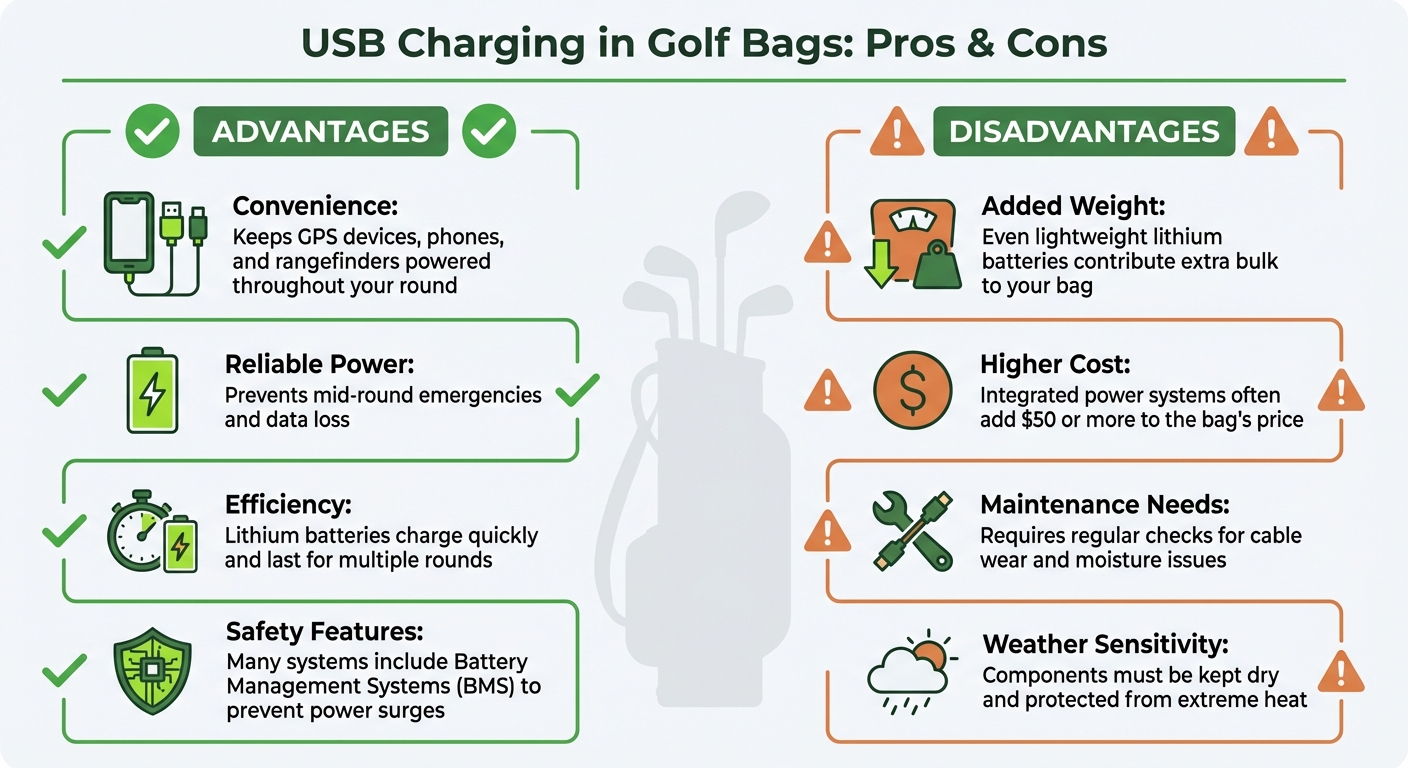
USB Charging Golf Bags: Pros vs Cons Comparison
Daily Use and Cable Management
Keeping your devices charged early in the day can save you from interruptions during your game. This is especially important for gadgets like GPS units and rangefinders that you rely on throughout a round. To avoid the hassle of tangled cords, use the integrated cables that come with many USB charging systems. For added convenience, store your power bank and any loose cables in designated valuables pockets. Many bags include features like velour lining or magnetic seals to protect your tech.
Pay attention to the LED display on your power bank during play to monitor battery levels. After each round, recharge the power bank using a wall outlet, but be cautious not to overcharge it – stick to under 10 hours. Afterward, clean the battery casing and USB ports with a damp cloth to remove dirt or grass. Just be sure to avoid using a pressure washer near any charging components, as this can cause damage.
Once you’ve mastered daily care, the next step is protecting your system from weather and travel-related risks.
Protection During Weather and Travel
Beyond routine care, it’s essential to protect your USB charging system from harsh weather and travel conditions. While materials like Ripstop Nylon provide some water resistance, they don’t make your system completely waterproof. Before heading out in wet conditions, double-check that port covers are sealed and the power bank is securely stored. If any part of the system becomes submerged or shows signs of water damage, stop using it immediately – damaged lithium batteries can pose serious fire hazards.
When charging, always choose a well-ventilated indoor area with a solid surface like concrete. Avoid placing the charger on carpets, which can trap heat. Keep the charging temperature between 41°F and 86°F; extreme temperatures can permanently harm the battery. For air travel, most golf bag power banks are compact enough for carry-on luggage, but it’s always a good idea to check the airline’s specific regulations. During the off-season, charge the battery to about 50–60%, disconnect it from the bag, and recharge it every two months to maintain its health.
Pros and Cons of USB Charging in Golf Bags
Here’s a quick breakdown of the benefits and drawbacks of using golf bags with built-in USB charging systems:
| Advantages | Disadvantages |
|---|---|
| Convenience: Keeps GPS devices, phones, and rangefinders powered throughout your round | Added Weight: Even lightweight lithium batteries contribute extra bulk to your bag |
| Reliable Power: Prevents mid-round emergencies and data loss | Higher Cost: Integrated power systems often add $50 or more to the bag’s price |
| Efficiency: Lithium batteries charge quickly and last for multiple rounds | Maintenance Needs: Requires regular checks for cable wear and moisture issues |
| Safety Features: Many systems include Battery Management Systems (BMS) to prevent power surges | Weather Sensitivity: Components must be kept dry and protected from extreme heat |
Conclusion
USB charging ports are changing the game for golf bags, turning them into portable power hubs that keep your devices running smoothly throughout your round. Whether you’re using GPS apps to navigate the course, playing music through a Bluetooth speaker, or capturing your swing for later analysis, these built-in charging systems ensure you won’t have to worry about your devices dying mid-game. It’s no surprise that industry leaders now see on-the-go charging as a must-have for golfers who rely on mobile tech during play.
Today’s systems are even more advanced, offering solar-assisted and rapid charging options that can handle multiple devices at once. Despite these capabilities, they remain lightweight, with many models weighing in at just about 5.5 lbs. This balance of convenience and portability ensures you can stay connected without feeling weighed down.
When choosing a golf bag with USB charging, think about what you need most: how many devices you typically use, whether solar or battery power suits your style, and how much weather protection your gear requires. Features like external ports for easy access and secure, weather-resistant pockets to safeguard your electronics make these bags a smart, functional choice for tech-savvy golfers.
よくあるご質問
How do solar panels in golf bags charge devices?
Solar panels integrated into golf bags harness sunlight through photovoltaic cells, which transform light into direct-current (DC) electricity. This energy flows through a small charge controller and is stored in an internal lithium-ion battery or a detachable power pack. Once the battery is charged, you can plug your device into the bag’s USB port to recharge it while you’re out on the course.
Using the system is simple – just let the solar panel face sunlight as you play. The bag will continuously gather and store energy, keeping your smartphone, GPS device, or rangefinder powered up without the need for extra chargers. This setup offers a practical way to stay charged while keeping the bag lightweight and easy to carry.
What safety tips should I follow when using USB charging ports in golf bags?
To safely use USB charging ports in your golf bag, make sure the power bank’s voltage aligns with the port’s requirements. Always use the cable that came with your device or a high-quality alternative. Keep the charging cable neatly organized, and unplug devices as soon as they’re fully charged to avoid overcharging. When not in use, cover the external USB port and zip up the internal power bank pocket to shield it from water, dust, or impact damage.
If you’re traveling, be mindful of TSA and airline rules regarding lithium-ion batteries. Power banks must have a capacity under 100 Wh and should always be packed in your carry-on luggage. Ensure the terminals are protected to prevent short circuits. Also, avoid using public USB outlets, as they can pose security risks. Sticking to your own power bank and cable offers a safer and more dependable way to charge your devices.
How do I pick the best golf bag with USB charging to match my needs?
When picking a USB-charging golf bag, it’s essential to match it to your playing habits. If you mostly ride in a golf cart, a cart bag with forward-facing pockets and generous storage space works best. On the other hand, if you prefer walking or using a push cart, a lightweight stand bag with a sleeker design will make your game more comfortable.
Next, evaluate your power requirements. Many of these bags come with built-in power banks, usually ranging from 7,800 mAh to 10,000 mAh. These capacities are great for recharging devices like smartphones, GPS units, or Bluetooth speakers several times. If you’re someone who depends on multiple gadgets during a round, look for a bag with a higher-capacity battery and dual USB ports, so you can charge more than one device at once.
Don’t overlook the finer details, either. Features like durable construction, water-resistant pockets, and secure cart straps can make a big difference. Cooler compartments and easy-access pockets for essentials like your rangefinder add even more convenience. Aim for a bag that combines practicality and comfort, ensuring you stay organized and powered up throughout your game.

 日本語
日本語  English
  Português
  Français
  Español