Most golfers don’t need more golf bag features. They need the right setup for 18 holes. If I’m choosing a tech-ready golf bag, I’d check fit first, then device access, power bank space, rain protection, pocket layout, and sample quality before ordering.
Here’s the short version:
- I’d match the bag to how I play: walk, ride, or both
- I’d avoid a carry bag over 5 lbs empty if I walk often
- I’d check for full-length dividers and a top size that fits my grips
- I’d make sure my phone, GPS, and rangefinder are easy to reach with one hand
- I’d look for a separate power bank sleeve and clean cable routing
- I’d check for water-repellent fabric, sealed tech-pocket zippers, and a full rain hood
- I’d keep wet gear outside the bag with items like a towel ring, umbrella sleeve, and glove patch
- If I were buying for a brand or team, I’d confirm logo placement, color codes, pocket specs, and sample pass/fail checks
A round can last 4 to 5 hours, and a phone using GPS can lose a lot of battery during that time. That’s why storage alone isn’t enough. The bag has to let me use my gear without slowing me down.
A Golf Bag That Follows You? The Future Is Now
sbb-itb-4fa7e8b
Quick Comparison
| Check area | What I’d look for |
|---|---|
| Bag type | Carry for walkers, cart for riders, hybrid for both |
| Weight | Under 5 lbs empty for most walking bags |
| Club storage | Full-length dividers and the right top size |
| Tech access | One-hand reach for phone, GPS, and rangefinder |
| Charging setup | Power bank sleeve, short cable path, pocket pass-through |
| Weather cover | Rain hood, water-repellent shell, sealed tech zippers |
| Pocket layout | Separate spots for tech, balls, clothes, and wet items |
| Team/custom orders | Clear sample review before full production |
If I were comparing bags in the $200 to $350+ range, this is the filter I’d use to make the choice simple and clear.
Core Bag-Fit Checklist Before Checking Tech Features
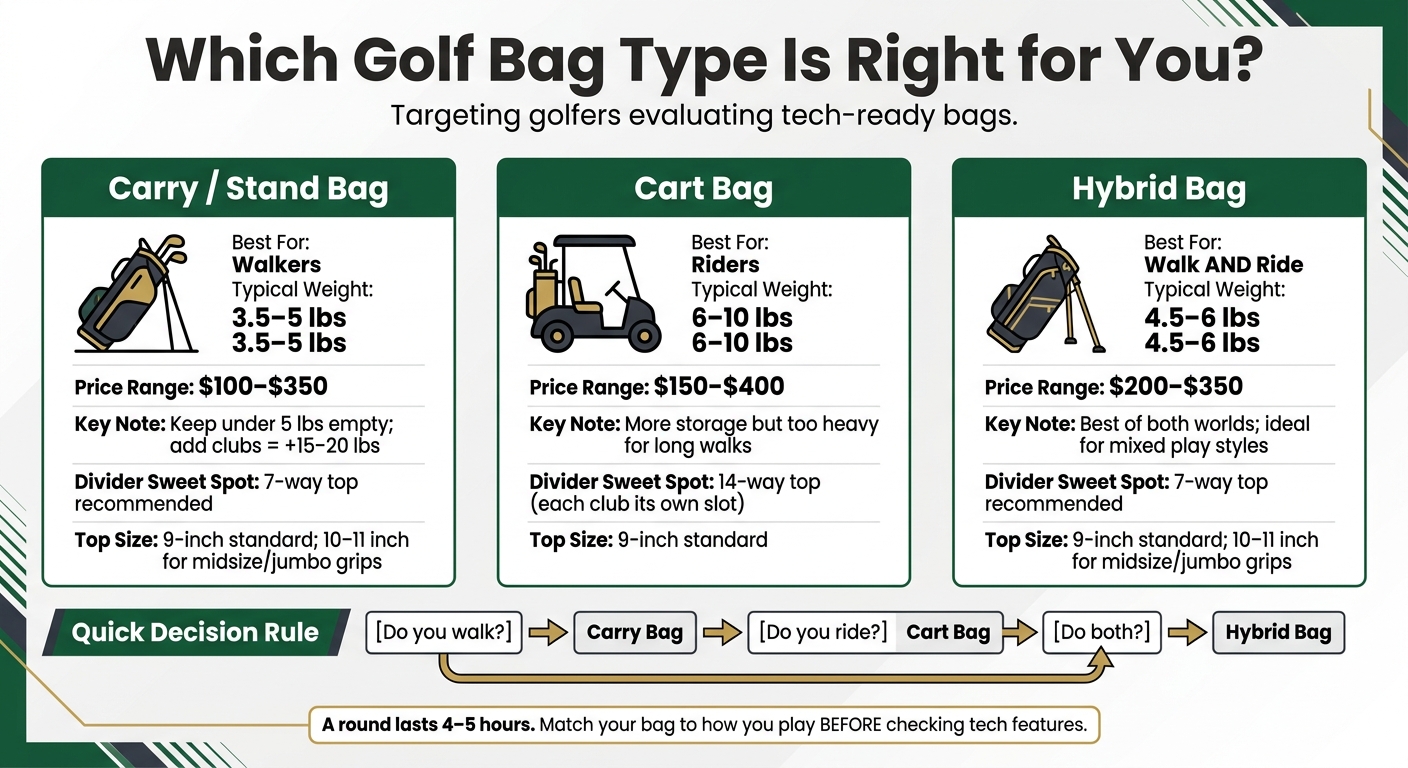
Tech-Ready Golf Bag Types: Carry vs. Cart vs. Hybrid Comparison
No built-in tech can save a bag that doesn’t fit the way you play. Start with fit first. Then look at the extra features.
Match the Bag Type to How You Actually Play
Start with one simple question: Do you walk, ride, or do both?
| Bag Type | Best For | Typical Weight | Price Range |
|---|---|---|---|
| Carry / Stand Bag | Walkers | 3.5–5 lbs | $100–$350 |
| Cart Bag | Riders | 6–10 lbs | $150–$400 |
| Hybrid Bag | Walk and Ride | 4.5–6 lbs | $200–$350 |
If you split time between walking and riding, a carry bag or hybrid bag usually makes the most sense. A cart bag may look tempting for storage, but for 18 holes on foot, that extra weight can wear you down fast.
After you pick the bag type, look at the details that shape comfort and club access.
Check Weight, Dividers, and Club Access
If you walk, an empty carry bag over 5 lbs is a bad sign. Add clubs and you’re piling on another 15–20 lbs, so every extra ounce starts to count.
Full-length dividers are a pass/fail feature. Without them, clubs still tangle near the bottom no matter how many openings the top has. For most golfers, a 7-way top hits the sweet spot between easy access and lower weight. A 14-way top gives each club its own slot and cuts down on tangling, but it adds weight and tends to fit cart players better than walkers. A 4-way top trims weight, though it also means more club contact.
Top size matters too. Most bags come with a 9-inch top, and that works fine for standard grips. If you play with midsize or jumbo grips, go with a 10–11 inch top so clubs slide in and out without a fight.
Pocket count should match what you actually bring to the course. More pockets sound nice, but they also add weight. If you won’t use the extra space, there’s no good reason to pay for it.
Once the bag fits well and carries cleanly, then it makes sense to look at tech access and battery storage.
GPS and Power-Readiness Checklist
Next, check if you can use your electronics during a round without fighting the bag. A 4–5 hour round in mixed weather puts real pressure on how a bag handles devices, cables, and charging gear. Once fit is settled, the next step is simple: make sure your devices stay easy to reach while you play.
Quick Access for GPS, Phone, and Rangefinder
You should be able to grab your GPS unit, phone, or rangefinder with one hand from a cart or while carrying the bag – no unbuckling and no digging around. If it takes more than a couple of seconds, that pocket isn’t helping much.
Before you buy, do a quick in-store test. Strap the bag onto a demo cart, then open and close each tech pocket. A lot of bags seem easy to use on the sales floor, then become awkward once cart straps are tightened down. Phone and GPS pockets should sit on the front or upper side of the bag, clear of the spots where straps usually cross.
Zipper direction matters too. Top- or side-entry zippers that open toward you are much easier to use than ones hidden under flaps or facing the other way. Oversized rubber zipper pulls also make a difference, especially when your hands are wet or you’re in a hurry between shots. And check for soft lining – microfiber or velour – inside at least one pocket for your phone or rangefinder. A plain nylon compartment can wear down screens and lenses over time.
| Pocket Type | Purpose | Access Speed | Protection Level |
|---|---|---|---|
| GPS pocket | Quick yardage checks per hole | Fast – top or side zipper, one-hand reach | Moderate to high; soft lining or padding recommended |
| Rangefinder pocket | Shot-distance checks before each approach | Fast – magnetic flap, elastic holster, or shallow zip | Moderate to high; structured to prevent lens compression |
| Phone/utility pocket | Phone, earbuds, keys, small accessories | Quick but secure – not fully exposed | Moderate; soft-lined, water-resistant, separated from hard items |
Power Bank Space and Cable Routing
A smartphone running a GPS app can drain a noticeable amount of battery over an 18-hole round, depending on screen brightness and app use. That’s why it helps to plan space for a power bank ahead of time. Give it its own sleeve or pocket instead of tossing it into a shared ball pocket.
Look for a small interior sleeve or sub-pocket near the phone or GPS compartment so a short cable can connect without pulling or bending too much. Keep cables away from club dividers and the top opening. Here’s an easy test: connect a cable between a power bank and your phone, then pull out and put back a few clubs. If the cable snags or shifts around, the routing isn’t well thought out. Rubberized grommets or pass-throughs are a big plus because they let you charge with the pockets closed.
Small items like earbuds, adapters, and spare cables also need their own place. Elastic loops or mesh sleeves work well, especially when they’re separate from tees, gloves, and balls. That keeps clutter down and helps cords last longer. Next, check how the bag shields those devices from weather and hard items.
Storage, Protection, and Accessory Integration Checklist
Weather Protection and Materials
After you sort out tech access, the next thing to check is rain protection. The key question is simple: will the bag keep your electronics dry, not just your clubs?
Start with the rain hood. It should clip or zip over the full top opening and stay put. That means it covers the club heads and the upper pockets too, which is often where tech gear sits.
Then look at the fabric. Water-repellent shells like coated nylon, DWR, or TPU-laminated panels are a good sign. Some bags go a step further with fully seam-sealed construction. That usually means taped seams on the inside to help block water from sneaking in.
Pay close attention to the zippers on valuables and tech pockets. In wet weather, sealed or taped zippers make a big difference. Check for coated zipper tape and sealed stitching around those areas.
The base matters too. A molded or rubberized base helps the bag stand upright and keeps the bottom from soaking up water on wet fairways or cart paths.
Pocket Layout for Golf and Tech Accessories
Once weather protection looks solid, move on to pocket layout. Every item should have its own spot. That keeps electronics safer and helps stop hard gear from scraping or pressing against them.
A few things are worth checking right away:
- A fleece- or velour-lined valuables pocket that fits a phone with a case
- Large side apparel pockets that can hold a full rain jacket or extra layer without cramming it in
- A front ball pocket placed low and easy to reach
- External add-ons like a metal towel ring, umbrella sleeve with a strap, and a Velcro glove patch
Those outside features do more than add convenience. They keep wet or dirty items on the exterior, which helps protect the electronics stored inside.
| Accessory | Type | Best Pocket Location |
|---|---|---|
| Smartphone | Must-have | Soft-lined valuables pocket, upper/player-facing side |
| Rangefinder | Must-have | Dedicated pocket with magnetic or quick-zip closure |
| Power bank | Must-have | Interior sleeve near phone pocket with cable routing |
| Rain jacket | Must-have | Full-length side apparel pocket |
| Golf balls | Must-have | Front ball pocket, low and centered |
| Towel | Must-have | External metal towel ring |
| Umbrella | Must-have | External sleeve with securing strap |
| Spare glove | Must-have | External Velcro glove patch or shallow accessory pocket |
| Snacks/drinks | Optional | Insulated cooler pocket, away from tech pockets |
If you plan to carry extra gear, look for D-rings, clip-on points, or modular webbing. They let you attach add-on pouches without eating up the bag’s internal pocket space.
Customization and Final Inspection Checklist
Customization Options for Brand and Team Orders
Once the bag’s core tech layout is set, turn those choices into a production spec. For brand, corporate, or team orders, lock down logo placement, color matching, pocket layout, materials, and pattern design before sampling.
Logo placement matters more than it seems. A mark that looks good in a flat mockup can disappear once the bag is strapped to a cart or carried across a course. Put the primary logo on the large side panel or ball pocket so it stays easy to see on a riding cart, push cart, and in hand. Secondary marks, such as sponsor logos or wordmarks, usually work better on the strap or smaller side pockets.
Before you approve artwork, ask for a digital mockup viewed from 6–10 feet away. That gives you a better sense of how the branding will look in use, not just on a screen. For color, confirm accuracy with Pantone or CMYK codes and pre-production swatches.
For tech-ready bags, be specific about device storage. If the order includes custom GPS or rangefinder pockets, put the device dimensions, pocket location, and charging access in writing. Do the same for pocket lining, padding, and cable-routing details in the production brief. Small details here can save a lot of back-and-forth later.
Keep Perfect Golf handles OEM/ODM production end-to-end, covering design, sampling, production, inspection, packaging, and worldwide delivery. After that, check that the sample matches the approved spec before giving the green light to production.
Final Pass/Fail Review Before Ordering
Use the checklist below to compare the sample against your approved brief. Every line should be a clear pass. If one item misses the mark, flag it before you commit.
| Check | What to Verify |
|---|---|
| Core fit | Matches your play style and carries comfortably |
| Phone pocket | Fits your phone; soft-lined; easy to reach |
| GPS and rangefinder storage | Dedicated, protected pockets with secure closures |
| Power access | Power bank sleeve present; cable routing works with zippers closed |
| Rain protection | Water-repellent shell, sealed zippers on tech pockets, full rain hood |
| Accessory points | Built-in accessory points are present and functional |
| Durability | Seams, zippers, handles, and strap anchors show no weak points |
| Branding accuracy | Logo size, placement, color, and stitching match approved artwork |
Use your actual phone, rangefinder, and power bank when testing the sample. Run a cable through the routing channel. Strap the bag to a cart and make sure nothing gets blocked or becomes hard to reach.
If you spot a problem, document it with photos and send clear revision notes back to the manufacturer before approving the final run.
Conclusion: Use This Checklist to Compare Bags Clearly
A tech-ready golf bag should support electronics without giving up carry comfort, cart fit, or easy club access. First and foremost, it needs to work like a golf bag. The tech should feel built in, not tacked on.
Once you’ve finished the checklist, compare each bag in the same sequence the list was built around. Start with fit. Then look at device access, power, weather protection, pocket layout, and finally customization.
That order matters. A bag can have all the charging ports and gadget storage in the world, but if it doesn’t fit well or gets in the way on the course, it’s a miss.
After the pass/fail review, the decision gets pretty clear. Use that review as your last filter: if one item fails, the bag fails.
This checklist helps you get past the sales pitch and judge bags by what counts on the course: fit, protection, and day-to-day function.
FAQs
How do I choose between a carry, cart, or hybrid bag?
Choose based on how you usually play:
- Carry bag: best if you walk the course and want something light and easy to carry.
- Cart bag: best if you mostly ride and want extra storage.
- Hybrid bag: best if you switch between walking and riding.
It also helps to think about the conditions you play in most often, how much gear you like to bring, and what feels most comfortable over a full round.
What size power bank fits best in a golf bag?
A power bank that’s about 6 inches by 3 inches fits nicely in a golf bag. It gives you enough charging capacity for your devices without eating up too much space.
Are waterproof zippers worth it on tech pockets?
Yes. Waterproof zippers are worth it on tech pockets because they help create a watertight closure that protects electronics and valuables from moisture and rain.
Related Blog Posts
- 5 Hidden Features to Add to Your Custom Golf Bag (e.g., GPS Pocket)
- Maximizing Storage: Innovative Pockets in Modern Golf Bags
- Smart Features in Golf Bags: Integrating Technology for Modern Golfers
- USB Charging Ports in Golf Bags: Convenience on the Course
Related Resources
Related Products
Explore our manufacturing capabilities in this category:
 Premium Stand Bag
 Ultra-Light Stand Bag
 Hybrid Stand Bag
 Rain-Resistant Stand Bag
 Premium Tour Cart Bag
 Lightweight Cart Bag
 Waterproof Cart Bag
 Staff Cart Bag
 Classic Sunday Carry Bag
 Ultra-Light Sunday Bag
Need custom golf bags? Contact us for OEM/ODM quotes — MOQ 100pcs, FOB Xiamen.